I’ve been having some issues with power to my Apple MacBook Pro 17″ Core Duo laptop recently. There have been issues with the fans for quite some time, especially the left one, so I thought that might have been part of the problem. The left fan was especially crunchy. So I ordered two new fans for it and went through the replacement process on my own (details to come in an upcoming post). That didn’t do the trick.
Later on that night, my MacBook shut itself off again. Really annoying. I flipped it over to look at the battery meter and noticed that the edge of the battery was above the edge of the battery compartment. I popped it out and low and behold, it was starting to swell. You could definitely feel some of the cells were expanding and thus pushing the “aluminum” plate off the battery. Having seen posts about this same problem online before, I did some hunting and found this article over at Apple.
I had already installed the Apple Battery Update 1.2, so I decided to roll the dice at my local Apple Store and see if I could get it replaced. My MacBook is out of warranty, so I was a little skeptical, but figured if it saved me the $129 for a new battery, it was worth a shot.
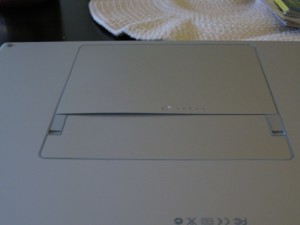
So off to the Apple Store at the Natick Collection in Natick, MA I went. The Mac Genius I spoke to, Ray, was very very nice and as soon as I showed him the battery he said he’d be more than happy to provide me a replacement at no charge even though the MacBook is out of warranty. Even more, this battery has its own new 1 year warranty, so I should be set if I have any more problems.
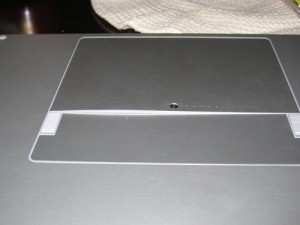
I think the model I had was A5389, serial number 6N7161H9WX4A. I’m not 100% sure when it was manufactured, but the date on it was 2006. Anyway, if you’re having similar issues with your MacBook, I definitely suggest that you go to the Apple Store and have them take a look. You might save yourself $129 in the process.
Yeah, I think we have the same 17″ MBP and mine also got the battery bubble a while back. Luckily getting a replacement was no problem. There’s something to say about Apple hardware, they always stand behind what they put out.
Yeah, I was totally impressed that they replaced the battery, no questions asked. The quality of their products and then standing behind them when something does go wrong definitely makes me a happy customer.
My 16 months old MBP’s battery just got swollen yesterday and I need a replacement too. I live in Thailand and I also bought my MBP here. It had a world-wide warranty, but expired in December. Would you by any chance know if Apple will replace my battery as well? We don’t have an official Apple office here, so I think I might have to send my battery back to the US for my friend to replace for me.
Paul,
I bet they will. Give Apple a call and ask them. From what I understand, its a pretty prevalent issue in some of the older MacBook Pro models. Hope you can get it fixed!
-Bill
By the way, do you have to visit an Apple Store or just any reseller to replace the battery? My friend lives in Fort Walton Beach, FL, but there are only resellers in that area. Any advice or help would be appreciated. Pls email to me, capoeira4u@hotmail.com. Thanks.
Its probably better to visit an Apple Store than a reseller because I think the Genius guy at the Apple store knows he can replace those batteries. A reseller might not.
Thanks for your replies Bill. Actually I couldn’t wait so I decided to call long-distance to the Apple Hotline. I spoke to them for about 15, and they told me they will give me a battery replacement for free. The guy told me to call my local hotline number in Thailand and said he would arrange everything for me. Wow! I’m really impressed. Now I just have to wait until tomorrow morning to call them. I hope I get my battery as they’ve promised.
I had a swollen battery in my 2 years old macbook pro 17″ last week. I noticed the problem because the click button of the mousepad was blocked. So I called Apple Switzerland. But after having given all details (serial number, cycles etc.) Apple refused to replace the battery. The guy at the phone pretended, a swollen battery is just what you have to expect after 2 years and 200 cycles. To me it seems that Apple treats customers differently, depending where you ar living. Really no goos publicity for the company.
Hans, that’s too bad. I really think a lot of my success story has to do with talking to the right person face to face at an Apple Store. Basically showing him my well taken care of MBP and saying that this just all of a sudden happened. The guy was more than happy to take care of me. Too bad you couldn’t get the same from Apple over the phone.
I had the same problem here in Allentown. Battery was HUGE and affected the trackpad action. Probably 2 to 3 years old. I went to the store with the battery expecting an easy exchange, but got some attitude in the process. “This one time we will make an exception” (whispering – pointing to the computer screen behind the genius bar) “The battery is a “consumerable” good and is not expected to last more than 12 months” “Your computer is not covered anymore because you did not sign up for Apple’s extended care” “You cant have the packaging for the battery – we need it to return the old one”
I left feeling small and dirty, and although I did not have to spend 129 bucks, I would not call it a happy experience. I guess you have to expect some condescension or snobbery in exchange for the best products?
I guess its starting to sound more like I got lucky and found a Mac Genius who truly wanted to help me. Maybe that kind of service isn’t at all Apple Stores. However, I’d have told the guy that if the battery just died then ok, no problem, I’ll buy a new one. But to swell up and cause a potential health issue or injury just isn’t kosher in my opinion. I’m glad that you were able to get your battery replaced though.
I got the same problem as Hans ! Apple Belgium told me they could not replace it for free, because it was out of warranty, they could not do anything about it. The guy i talked to on the phone said it was a common problem after two years of use, the battery swells as a protection reflex. Any ides on what to do next ? You think i should just buy a new battery ?
Two things I think helped me:
1.) I was able to go to an Apple store and talk to a Mac Genius directly.
2.) I got incredibly lucky that the gentleman I spoke with agreed that the battery should never do this and was willing to help me.
Its really easy for customer service people to blow you off over the phone, especially when they are probably told not to replace these batteries, especially when they are out of warranty. At this point, if you don’t have an Apple Store near you (I’m not sure if they are around in other countries), you might try and Authorized Reseller. Other than that, you might just have to bite the bullet and buy another one. Good luck!
I too have a swollen battery and am looking at various forums where there is clearly evidence that there is a problem with the macbook pro 17 inch battery. I have had mine replaced once whilst under warrenty, but now that the new one is out of warranty they will not replace it even though they admit it is a fault with the battery, they say it is a safety measure.
In our research lab (Belgium) we have 8 MBPs, 15 or 17 inch.
3 of them had a swollen battery (each shortly after one year of use). After taking the battery out, the battery kept on swelling up to double heigth.
Applecare replaced 2 batteries for free, but only after long telephone chats.
They (both the reseller where I bought a 3 year warranty pack, as Apple) refuse to replace third battery now (16 months old, no Applecare on this MBP) because it had little more then 300 cycles. They refuse to recognize it as a production fault.
I just had this issue arise with my almost 3 year old 17″ MBP. With 190 cycles on the battery I began having abrupt shut down issues, then I noticed my mouse button not clicking and etc…flipped over my machine and saw that the battery was swollen.
I called Apple and had no problem getting a replacement sent out. (I’m in the USA and I have about 4 months of Apple Care remaining.) The techs at Apple were very friendly, helpful and courteous.
However I was told that this is a “saftey mechinism” to prevent the faulty battery from damaging the machine. I call total BS on that. These batteries are faulty and this is a design/manufacturing flaw with them. No battery should EVER swell like this during normal operation even if it’s past it’s useful lifespan.
Total BS that folks in Europe are not getting any remedy for this. Swollen batteries can leak and you don’t want those chemicals getting on anything in your house or on your person. Period.
we had a battery on a computer that was out of warranty have a battery go bad at the agency i work at. the IT took it to the apple store where it was replaced with some attitude. A month later my home computer does the same. The apple store told me no and offered $30 off a new battery to which i said was unacceptable. another example of different treatment for the same issue. i left and called apple and got the same song. that the battery is designed to do that. BS! i have two older laptops at home that have not done anything like that. what engineer would design a battery to explode when it was used up and potentially destroy the computer or injure a person?
shame on you Apple. i thought much more of you, your products and your customer service before today and don’t mind telling the world about it
I am so happy-I thought my beloved MacBook pro was dying-I have had my laptop on a desk running on power and didn’t think to look underneath when my cursor started acting erratically and it started highlighting and dragging text and images-I was about to take it for a repair quote and was wondering how I was going to survive without it and saw this post in a Google search. I turned my laptop over and the battery was swelling and had popped up on one side-I removed it and my computer is back to normal-I called my local Apple Store and he said to come in for a replacement-free-so I just saved $129……happy ending for sure!
Melissa,
I’m so glad that Apple gave you a replacement battery free of charge. I think that its totally random who they help out and who they don’t, but it’s great that some of us were able to save $129!
-Bill