Happy New Year wishes to all my friends and family out there. Same to the few people who actually read my blog. Thanks for coming by. The posts were a little few and far between in 2008. Here’s hoping that 2009 brings me a little more time to blog about things I’ve learned and things that I’m interested in. Stay tuned and I’ll see everyone in 2009!
Monthly Archives: December 2008
Does Texeira Equal A Championship For the Yankees?
So I guess its official that the Mark Texeira sweepstakes are over. The NY Yankees are getting him for 8 years and $180 million dollars, giving them the four highest paid players in all of baseball. Rumors had Texeira landing with my Boston Red Sox, but you can never count the Yankees out of any deal that means they can spend a ton of money. Anyway, congrats, I guess, to all you Yankees fans out there. But remember this, the Sox still have more championships this decade than you do and just ’cause you have spent all this money doesn’t mean you can beat out the Sox or even the Tampa Bay Rays for the AL East.
Oh yeah, I almost forgot. Do you think the Yankees will ever learn that they can’t just buy a championship? I’m not sure they ever will.
Keyword Tracking with Caphyon’s Advanced Web Ranking
I’ve been honing my skills over the last few months with optimizing our e-commerce sites for search engines. Its been a long, arduous task. One that requires the utmost patience. When things go wrong, it seems like the world is ending. But, like one of my favorite books was famous for saying, Don’t Panic!
Over this period of time of getting up to speed on search engine optimization, I’ve been looking for a tool to help me track our rankings for keywords we’re going after. I had been using this huge Excel spreadsheet to track rankings on a bi-weekly basis, but it was a pain in the butt to update. I found some online tools that would let you track a few keywords, but nothing all that awesome. That, and I really wanted a desktop application for this. Don’t ask me why.
So, I was reading YOUMoz the other day and came across this post about the author’s troubles with MSN Live Search. She mentioned she used this tool to track keyword positioning, so I decided it was worth a look. I downloaded the 30 day trial version and installed it on my MacBook Pro.
Setting it all up with keywords I was interested in for my site was a little time consuming, but I didn’t mind that. I gave it a run and I got a great breakdown of keywords we ranked well for and keywords we didn’t. This is cool as now I can see where I need to put some work in. But that wasn’t the coolest part. The following day, I ran it again. Now I could compare my results from today to the previous day. Kick. Ass. Even better, it stores your results for each day, so you could see how you did over the course of a month or a quarter or a year.
I find this to be a huge time saver because I don’t have to manage my rankings. All I have to do is add new keywords I want to track. When I want to update my positioning results, I just click a “Play” button and away the tool goes. I highly recommend this application to anyone tracking their SERPs in any of the major search engines.
Has Google Tweaked Their Search Algorithm?
In mid to late November, I noticed traffic to one of my e-commerce sites dropped dramatically. Some quick research in Google Analytics turned up that our Google organic traffic dropped off significantly. This came as a huge shock to us because we were cruising along really, really well for some important key terms that drive quality traffic to our sites. This equates to lost dollars since we aren’t getting the visits that could turn into conversions.
After some research and conversations with other web developers I know, I came to the conclusion that nothing I had really done to our site would have caused the drop off in traffic. What’s worse is that we seemed to have dropped out of the Top 100 for key terms that we had previously ranked high in the Top 10 for. Really. Big. Problem.
So what happened? My guess is Google tweaked up their search algorithm a little. My reasoning came from the Google tools that I use on a daily basis to manage my sites. Take a look first at the image below. What it shows is our Google organic traffic from November 1, 2008 through December 4, 2008.

What you can see here is that we were flying at something around 1,800 to 2,300 visits a day. Good stuff. Then around November 11, things dropped down sharply. I kind of panicked here, but didn’t change the site up any. Then on the 14th, we were back up again. Way up. For the next 5 days, we were up around 2,600 visits a day, even peaking over 2,700 one day. Then on the 15th, things fell apart again. We were down slightly. Ok, only one day. Don’t panic.
Then I did panic. On November 20th, we were down to just over 1,000 visits. Ouch. Over the next 2 weeks, we went as low as around 850 visits. This was a problem. What happened? I didn’t change up the site in a way that should have affected our rankings from all the research I had done on my own and with other developers. So what gives? Take a look at the image below, which shows Google crawl stats
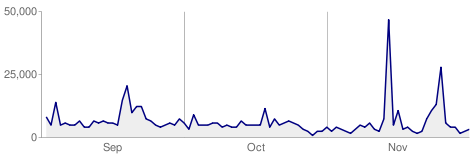
See the huge spike around the second week in November? That’s about when things started to hit the proverbial fan. This spike looks like a deep crawl of our site by Google. I’ve never seen Google crawl our site this much all at one point. To me, this indicates changes were afoot over at Google. What changes, who knows. Only Google does. What I do hope is that our site comes back up in the rankings as its a well built site, adhering to Google’s guide for building quality sites.
The bright spot here is that we’re starting to come back for some of our key terms and our organic traffic from Google is looking better. At the same time, our traffic from MSN and Yahoo has continued to get better, so this is another indication that Google changed something up. Also, using Google Webmaster Tools and Google Analytics can provide you with great insight into what Google sees of your web site as well as how people find and use your site. I highly recommend using both if you don’t already.

Google AdWords Now Has Device Platform Setting

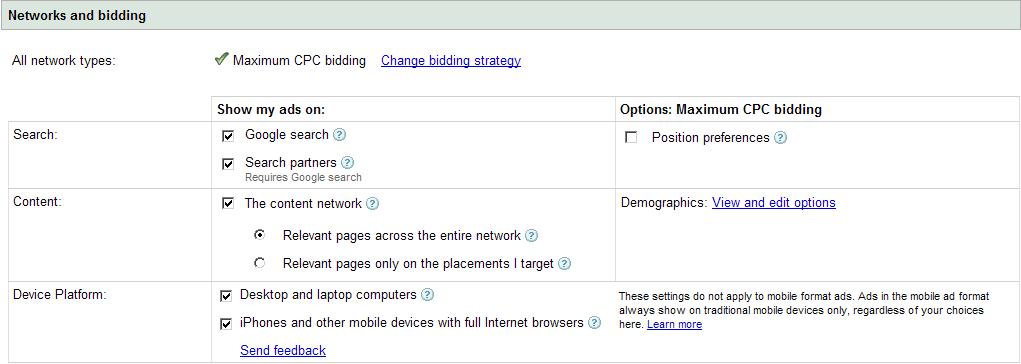
I just set up a couple of new campaigns in Google AdWords this afternoon and, for the first time, noticed that you can now select a device platform for your ad campaigns. The choices are desktop or laptop computers, or mobile devices that support a full web browser. These mobile devices are devices like Apple’s iPhone. Click the screen shot below to see these settings:
This is definitely interesting because there are surely some instances where you’d want to restrict your ads from showing up on a mobile device. I’m considering turning it off for our campaigns because we run an e-commerce site and its really unclear at this point if people are really into shopping online using their mobile devices. I have no doubt that this will become widespread behavior in the future, but with mobile devices with full browser capability just coming to market, I have a feeling this is a small niche crowd that would shop via their mobile device.