I’m always looking for an edge over our competitors to make using our e-commerce sites better from a usability standpoint. I think one of the easiest things to make the experience better is to make sure your site is responsive when people visit it, no matter what kind of connection they have or what they have for a computer. I decided to do some research on how to improve our sites download times and came across YSlow for Firebug.
YSlow is a Firefox extension that plugs into the Firebug extension. Any developer that doesn’t use Firebug is really missing out. So if you don’t have it, get it. Anyway, you can install YSlow right into Firefox and get access it through Firebug.
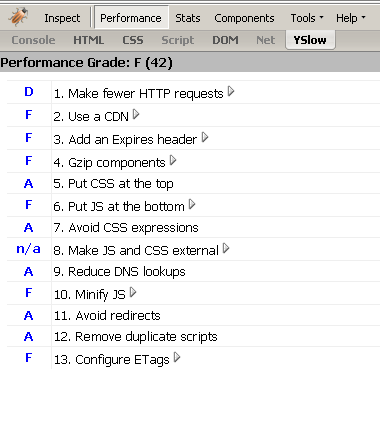
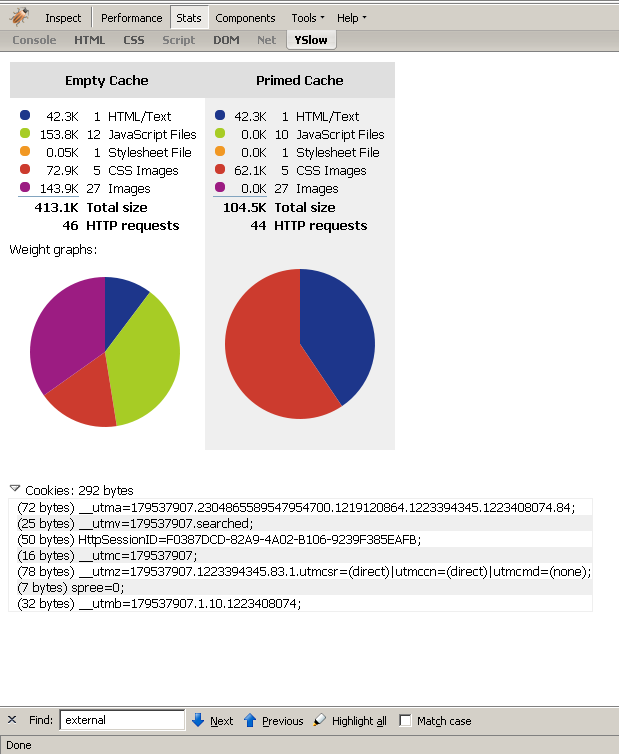
Upon analyzing our site the first time, we received a score of 42 from YSlow, which was an F. Ouch. That didn’t make me feel all that great about our site. You can see screen shots of our initial scores here and here. We scored really low for all but four of the thirteen performance criteria. I decided to attack the easiest tasks to complete first. This was Minify JS, Add an Expires header, and Gzip components.
I minified our javascript files using a utility called JSMin. It basically removes all whitespace and line returns from your file. It doesn’t compress the code all the way, but I wanted it to remain a little readable if I needed to look at the code on the live search.
Next, I wanted to handle adding an expires header. Since we use ASP.NET and C# for our web application, I was able to write a HttpHandler to do this for me. What was even better was I was able to handle the expires header and another issue, ETags configuration, all in the same snippet of code. For each request, our HttpHandler adds an empty ETag and an Expires Header of 3 days in the future. Both of these are used to determine when a cached copy of a web page needs to be refreshed. The ETag tells the browser that the version it sees now is different from the original. The Expires header obviously sets the expiration on the page.
Lastly, I wanted to GZip all of our components. This just required configuration of our IIS Server. You can also do this directly within your .NET application, but I didn’t see the value in this as IIS could do it for us.
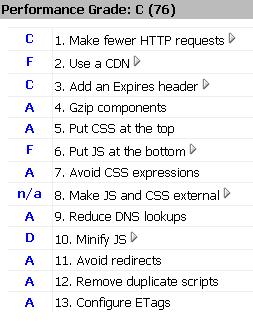
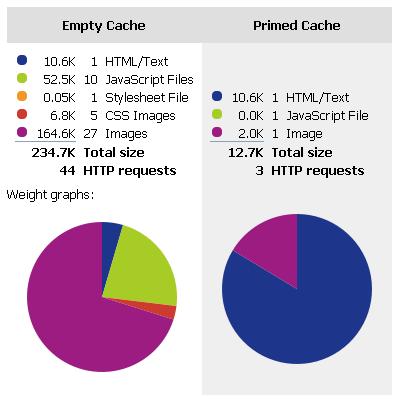
After implementing these changes and a few other mundane ones, I ran YSlow again. Low and behold, we’d gone from a score of 42 to a score of 76. Not bad! We’re now scoring a “High C” according to YSlow. From a usability standpoint, I could definitely tell that the site responded much faster than it did when we were scoring a 42. For those of you that would like to see screen shots of the stats, you can see them here and here. Looking at the stats, you can see that we cut down the data downloaded from 413.1k to 234k, which looks like a huge improvement.
I strongly recommend anyone who’s developing web applications to take a look at YSlow. You might not be able to implement changes for all of the points it says you’re not doing well for, but even 2 or 3 changes should net you some great improvements in the performance of your site.

 and
and  . Apparently its a new way to say, “Yeah, this result was useful to me or No, its not.”. I’m guessing Google wants to see what actual human beings think of the results that they’re displaying. Obviously the Google engine is only an engine, based on a machine and code, so it’s not 100% perfect. Grabbing the human factor of a useful or not so useful search result is something they’d definitely want to know.